
You have years of work in Finale: commissions, arrangements, teaching materials, a catalog someone may ask you to reprint next month. Since MakeMusic ended Finale’s development in August 2024, the question has hung over every one of those files. How do you keep opening, correcting, and delivering this music without losing time or quality?
When Finale was discontinued, the honest answer was narrow: no program other than Finale could open .musx or .mus files. If you had a working copy of Finale on an operating system that still supported it, you could edit, save, and export. If you didn’t, your files were locked.
That has changed. The biggest step came at the end of September 2026, when a free notation program called Maestro appeared that opens Finale files directly. This guide explains what Maestro is, what it does well, where it still falls short, and how to build a sensible plan for an archive you can’t afford to lose.
Where Finale users stand today
It helps to start with what MakeMusic itself says, because some of it has changed since the original announcement.
- Development and sales ended on August 26, 2024. MakeMusic wrote that “There will be no further updates to Finale.”
- Your installed copy keeps working, as long as your operating system supports it. Finale 27.4.1 is officially compatible with macOS 10.14 Mojave through macOS 14 Sonoma, and with Windows 10 and 11. MakeMusic says macOS 15 Sequoia is not compatible, although Finale may still run on it, and users have reported problems running Finale on macOS 26 Tahoe. So avoid major operating system upgrades on the computer you use for Finale. If you have only one computer and want to upgrade it, you can keep Finale on an older, compatible system inside a virtual machine, using an app such as Parallels Desktop on a Mac or VMware Workstation Pro on Windows.
- The original letter said authorization on new computers would stop in August 2025. A day later MakeMusic said it would remain available “for the foreseeable future,” and a July 2, 2026 update made it permanent: “Authorization of Finale on new devices will continue indefinitely.”
- The discounted move to Dorico for Finale users still exists, but since July 23, 2026 it is sold directly by Steinberg rather than through the Finale eStore.
- Finale v27 can export your files as MusicXML 4.0, which remains the most complete way to move a Finale score into another program.
So Finale has not vanished overnight. But every operating system update is a risk, there is no technical support, and no new features or fixes are coming. That is why we advise against starting new work in Finale. The real question is how to look after the work you already have.
What Maestro is
Maestro describes itself as “a music notation editor designed for people coming from Finale.” The facts, as published on its official site:
- It is free, with no subscription and no account. The developers state it “will stay free.”
- It runs on macOS 13 Ventura or later (Apple Silicon or Intel) and on 64-bit Windows 10 or 11. A Windows version is also listed in the Microsoft Store.
- Its interface is available in nine languages, including English, French, German, Italian, and Spanish.
- It is still in beta. The first public version appeared on September 29, 2026, and the version on its site when we checked on October 22, 2026 was 0.9.108. Updates arrive very often, so details change quickly.
- The app’s privacy policy names Arduino Martini as its developer, and its FAQ describes its makers as “a group of musicians who are also developers.”
It is a full notation editor, not only a converter. Former Finale users will recognize much of it: Simple Entry, Speedy Entry, four layers, Page View and Scroll View, and many familiar keyboard shortcuts. It also ships with Finale’s own music fonts, which MakeMusic released under the SIL Open Font License with Finale v27, so scores written in those fonts display as they should.
What Maestro does with your Finale files
Opening
According to Maestro’s “From Finale” page, it reads .musx files from Finale 2012 onward and older .mus files going back to Finale 1.0, without Finale installed. The import covers notes, rests, chords, ties, slurs, tuplets, grace notes, all four layers, dynamics, articulations, lyrics, chord symbols, repeats, pickup measures, and page text.
One caution on older files. Scoring Notes reported on October 12, 2026 that files from the early 1990s were not supported and that files from Finale 2000 to 2006 lost layout and percussion information. Maestro’s own page now describes wider support. Both may be true at different moments of a fast-moving beta, so test your oldest files before you rely on them.
Editing and saving
Once imported, a score becomes a Maestro document in its own .maestro format, ready to edit. You can then export it:
- back to Finale (.musx), using Maestro’s layout. Finale recreates the parts when you open the file.
- as MusicXML, for MuseScore Studio, Dorico, or Sibelius.
- as PDF, MIDI, or audio.
Maestro can also work through a whole folder at once. Its Scripts → Run on a Folder… command applies a script you choose to every score in a folder and its subfolders, Finale files included, and can save the results as MusicXML, Finale (.musx), or Maestro documents in a separate folder. The original files are never changed. That is a significant help if you have hundreds of files and no working copy of Finale.
What to check after every import
Maestro’s developers are open about what doesn’t carry over yet. Their list is worth reading closely, because each item is something you would otherwise discover in rehearsal.
- Linked parts. Maestro uses the score and rebuilds the parts itself, so any change you made only in a part (a cue, a page turn fixed by hand, a part-only dynamic) is not kept.
- Chord symbols in older .mus files. Maestro’s “From Finale” page still lists these as not imported, but version 0.9.108 (October 22, 2026) added them, so check them carefully.
- Lines. Lines other than slurs, hairpins, glissandos, and octave lines may not come across, and neither may non-standard repeat texts.
- Voice 2 notes are placed in a free layer, and Maestro reports any notes that find no room.
- Figured bass may come in only partially, depending on the font used.
- Tablature arrives as five-line staves instead of six.
- Plug-ins. Maestro has its own scripts, but FinaleScript, TGTools, and Finale’s Lua plug-ins don’t run in it, so any layout that depended on them may need rebuilding.
An independent review found much the same. In a hands-on review for Scoring Notes published October 15, 2026, Ben Byram-Wigfield found that Maestro “does import the vast majority of notation and text data correctly,” with systems laid out as in the original but layout and positioning slightly off. He also found “many fundamental problems with spacing, beaming, stem lengths, and the finer points of engraving,” and almost no options for manual adjustment at the time. A round trip back to Finale squeezed some notes together and changed the capitalization of some text. He called the premise “certainly exciting” but concluded that Maestro was not yet a viable replacement for Finale. In a comment on October 18, he noted that Maestro had since added Engraving Options and that most objects could now be adjusted by hand.
That is a fair picture of a promising beta: very useful for access and conversion, still maturing as an engraving tool.
What we found in our own tests
As a professional engraving studio, we still open our clients’ Finale files in Finale itself, on an older Mac and an older PC, and in Mac and Windows virtual machines. It is still the only way to see a file exactly as it was made. Even so, Maestro, with its modern interface, wide range of features, ease of use, and nine interface languages, may be a good way for some users to open Finale files and keep working on them in a new but familiar environment.
We tested the latest version, 0.9.108 beta, with Finale files from our own archive and found the following:
- The look of bar numbers is lost, including their size, font style, and enclosure.
- Page layout doesn’t convert perfectly, though files from recent Finale versions fare better. The differences go beyond the spacing between staves: bar widths change, which changes the number of bars per system and the placement of dynamics.
- Not all articulations come across, including tremolos and fermatas over empty bars, and some legato markings need editing.
- An old Finale file without the .mus extension won’t open until you add the extension to its file name.
- Page text such as the title, subtitle, and composer name needs repositioning and restyling.
- Linked parts are supported, though Maestro rebuilds them from the score, as noted above.
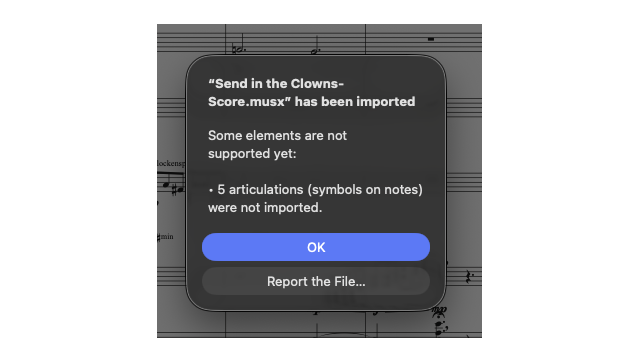
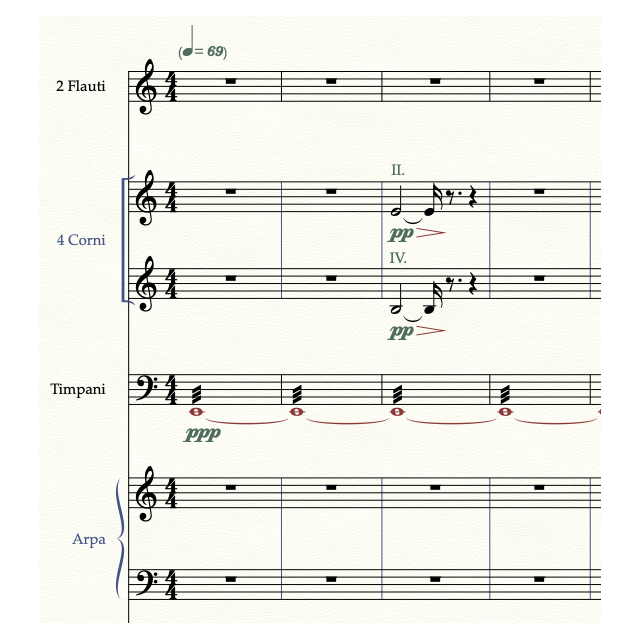
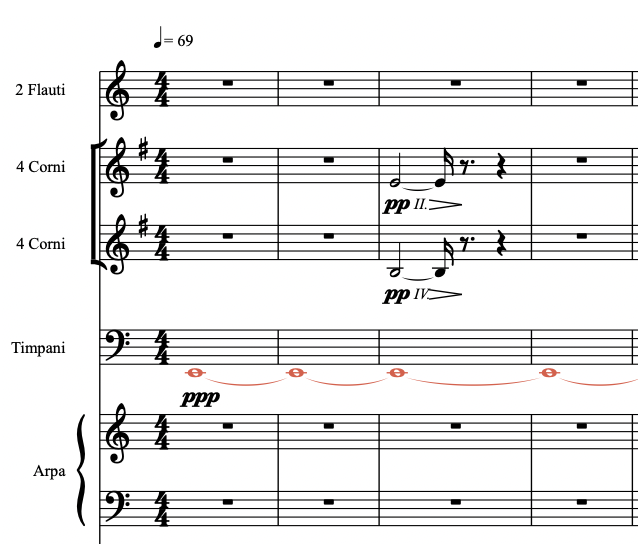
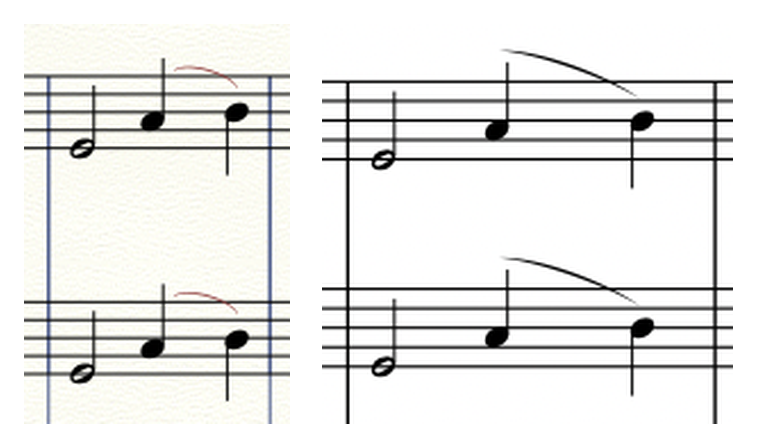
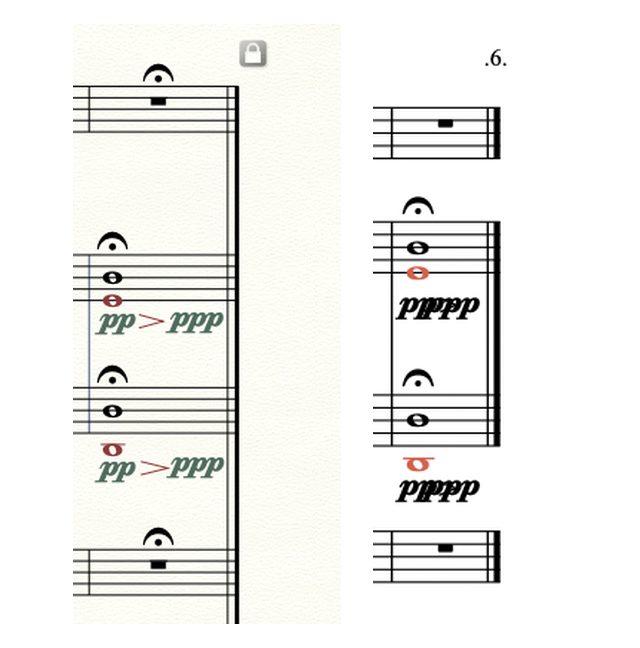
The good news is that Maestro is free, so you can try it with your own Finale files and decide whether it is worth using.
Another free option: Denigma Online
If you only need to get your music out of Finale files rather than edit it, Denigma Online is worth knowing. It was built by Robert Patterson, the developer of the Patterson Plug-ins, and it converts .musx files and older .mus files to MusicXML in your web browser. It is free, and your files are never uploaded. It is still a technology preview, so check what it exports, and note that the MusicXML it produces does not carry linked-part formatting. Scoring Notes has a step-by-step guide to using it.
Three sensible ways to handle a Finale archive
There is no single right answer. It depends on how often you reopen old work and what that work is for.
1. Keep access, change nothing yet
If Finale still runs on one of your computers, use it while you can to export every important file as MusicXML (version 4.0 if you have Finale v27) and as a PDF. The MusicXML is your editable bridge to the future. The PDF is your reference for what the score is supposed to look like. Maestro and Denigma Online are then free safety nets: if that computer or Finale stops working, you can still open or convert the originals.
2. Use Maestro for reading, light edits, and conversion
For a quick correction to an old lead sheet, a transposition for a student, or a set of parts that only needs reprinting, Maestro may be all you need today. Treat anything you export as a draft and proofread it against your PDF before it goes to players.
3. Move to a program you will keep for the next decade
For music that will be published, performed by professionals, or revised for years, a supported notation program is the long-term home. Dorico, Sibelius, and MuseScore Studio all import MusicXML, and MuseScore has said it has invested heavily in MusicXML import for Finale and Sibelius files. Whichever route you take, from Finale or from Maestro, the conversion is never the end of the job. Spacing, cues, page turns, part layout, and house style always need checking by someone who reads the score as a performer will.
A practical plan for a large archive
If you have dozens or hundreds of files, a little order saves a lot of time.
- Make an inventory. List every file with its title, Finale version if you know it, and whether it has linked parts.
- Create a reference PDF of every score and part in Finale while you still can. If Finale is no longer available, a PDF from Maestro is a useful guide but not an exact record of the original layout.
- Sort by what’s coming. Files needed for a performance, publication, or client in the next twelve months come first. Files nobody has asked for in ten years can wait.
- Test your oldest and most complex files first. A large orchestral score from an early Finale version, or one with hand-adjusted linked parts, will tell you more about the risks than a recent lead sheet.
- Compare bar by bar against the reference PDF: notes, rhythms, dynamics, articulations, text, and especially anything you fixed only in the parts.
- Keep the originals. Never delete a .musx or .mus file after converting it. It remains your source of truth.
When it pays to have the conversion done professionally
Converting a file is quick. Making the converted file performance-ready is where the time goes. A score can open perfectly and still have collisions, poor page turns, lost cues, and parts that no longer match what the players used in a previous performance.
It is worth handing the work to a specialist when the music is going to print or to a publisher, when professional players will read it under rehearsal pressure, when the archive is large and your time is better spent composing or orchestrating, or when the files depend heavily on linked-part edits or plug-in layouts.
This is the core of our Music Engraving & Score Preparation work. Samy Elgazzar has worked in Finale since 1992, and from 1995 to 2011 he was the Finale expert and user technical support specialist for Fagotto Music, Finale’s dealer in Greece. That is why we read Finale files of every vintage and know where their problems hide. We rebuild them in Dorico, Sibelius, or MuseScore Studio, check every bar against your reference, and deliver clean, performance-ready scores and parts.
What this means for you
Your Finale work is not trapped. Finale still runs on computers with a compatible operating system, MakeMusic now allows authorization on new devices indefinitely, and Maestro gives you a free way to open .musx and .mus files without Finale at all. What none of these tools can do yet is guarantee that a converted score is ready for players. Export your files as MusicXML and PDF while you can, test the ones that matter most, and choose a supported program for anything you will keep using.
Frequently asked questions
Can I open Finale files without Finale?
Yes. Maestro, a free beta for Mac and Windows as of this writing, opens .musx and .mus files directly. Check the results carefully, especially part-only edits, special lines, and chord symbols in older files.
Is Maestro a replacement for Finale?
Not yet, according to our tests and the most detailed independent review so far. It is very useful for opening, light editing, and converting to MusicXML, and it is improving quickly, but its engraving controls are still maturing.
Will my linked parts survive the conversion?
Not exactly as they were. Maestro rebuilds parts from the full score, so changes made only in the parts are lost. Compare every part against a PDF of the original before it reaches a player.
Should I keep using Finale for new projects?
We don’t recommend it. Finale receives no updates or technical support, and each operating system change is a risk. Use Finale, or Maestro, to export your existing work, and start new projects in an actively developed program. If you do keep working in Finale, keep that computer on macOS 14 Sonoma or earlier, or on Windows 10 or 11, the latest systems Finale is officially compatible with, and don’t upgrade it. If you need a newer system for other work, run Finale in a virtual machine instead.
Let’s protect the music you have already written
If your Finale archive holds work you will need again, send us two or three representative files with a note about what you need them for. We will look at what converts cleanly, what needs rebuilding, and what it will take to make them performance-ready. We reply within 12 hours, and once we have seen the files, Samy will send you a clear, fixed-scope quote. Start on our Music Engraving & Score Preparation page, see our published rates, or contact us directly.